



Smart Screen Recorder
A creative, lightweight, clean and super-responsive Chrome extension that records your screen and uploads your recordings to Google Drive — built and operated by IBWare.
What is Smart Screen Recorder?
Smart Screen Recorder is a Google Chrome extension that gives you the ability to record your screen, a Chrome tab, or a particular window — without the need to install any external software or any other tool. It is lightweight, clean and designed to stay out of your way.
Automatic upload to Google Drive
With Smart Screen Recorder you can automatically keep a backup of your recordings the moment a recording finishes. Sign in to the extension with your Google Account and grant access to your Google Drive, and the extension will upload each recording into a dedicated folder in your own Drive.
You stay fully in control — you can use the extension anonymously and only enable the Google Drive upload feature if you choose to.
Read our Privacy PolicyWhy people use it
- Record full screen, a window, or a single tab
- No external software to install
- Automatic, secure Google Drive backups
- Clean, lightweight and responsive
- Free on the Chrome Web Store
Install & use it in 5 steps
From installation to your first auto-uploaded recording.
Get started
Add the Smart Screen Recorder extension to your Google Chrome browser.
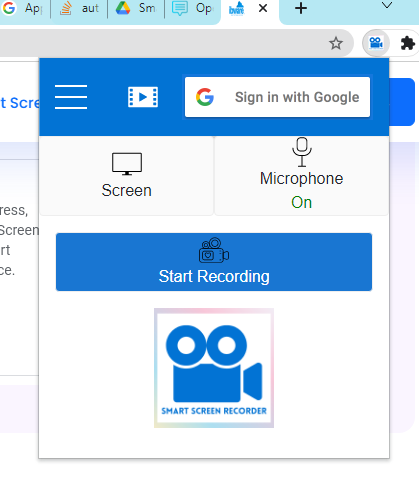
Get it now for freeOpen the extension and click Sign In
Open the extension from your browser toolbar and click Sign In.
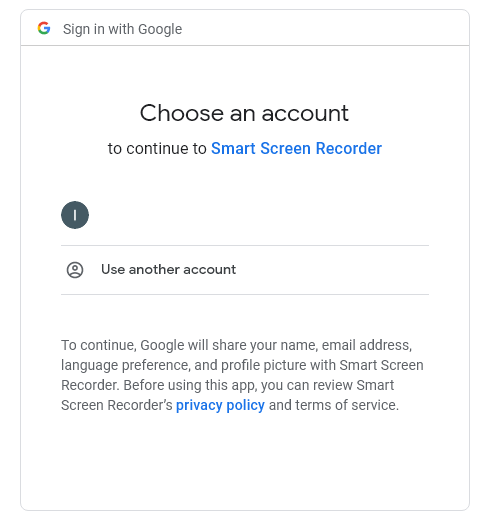
Choose a Google account
Google will ask you to choose an account to continue to Smart Screen Recorder. This step is handled securely by Google.
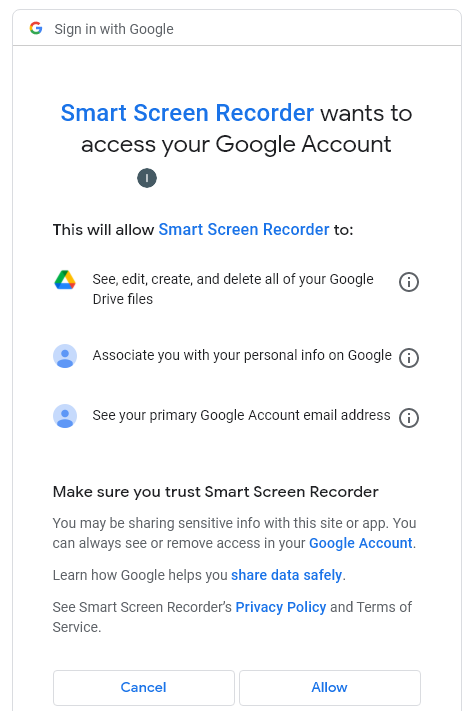
Grant Google Drive access
Google will inform you that Smart Screen Recorder will be granted access to your Google Drive and email address. Click allow if you want to use the automatic upload feature.
You're done
Watch the short video below to see how to record your screen and how recordings upload automatically to your Google Drive.
Start recording in seconds
Add Smart Screen Recorder to Chrome for free and keep every recording safely backed up to your Google Drive.